FAQ
Have questions about using Webooker?
Here you'll find answers to the most common questions about our booking system – from registration and calendar setup to managing bookings and payments.






What does Webooker help me with?
Webooker is an online system that helps you manage everything around your courses – from enrollments to invoices.
Students reserve their place through the system, pay, report an absence or find a compensation lesson. The teacher knows who is coming. Parents stay on top of everything. And you save time and effort.
Webooker brings order to your entire operation – whether you run a language school, a dance studio or weekend workshops.
How do people register for courses?
Simply and online. The customer selects a course on your Webooker page, creates a registration, accepts the terms and pays directly by card or bank transfer.
The system sends a confirmation, issues the invoice and adds the person to the student list.
You can immediately see who enrolled, how many places are still available and who has already paid.
No paperwork, no manual copying. Everything runs automatically and clearly.
And above all – no one has to spend Sunday evening sorting through emails and spreadsheets.
Can I receive course fees through Webooker?
Yes.
You can connect Webooker to your bank and a payment provider. Students can then pay by bank transfer or conveniently online by card.
The system issues an invoice, records the payment, assigns it to the student and sends a payment confirmation or tax receipt.
You stay in control without having to check bank statements manually.
How does the connection to the payment gateway work?
Stripe is a secure online payment gateway for card payments.
You can connect it to Webooker easily – create an account and enter your credentials in the settings.
Customers can then pay directly when enrolling in a course.
Payments are automatically linked to invoices, and everything is clearly organized in one place.
What if I have a student list in Excel or use another system?
You do not have to start from scratch.
If you already have your student list in Excel or in another system, we will help you import the data.
Simply upload your spreadsheet in the system and write to us at sales@aperus.eu – we will handle the data import into Webooker.
After registration, the system guides you through the initial setup step by step, including sample data to try out. You also get access to detailed guides and help texts.
The tutorial itself is completely free.
How does Webooker handle schedules, course capacities and other admin tasks?
Webooker is more than just a calendar – it is a complete system for organizing courses, attendance, payments and communication.
Organizations that manage hundreds of customers, dozens of courses and entire teams of teachers and administrative staff use it.
At the same time, it works just as well for individuals who run only a few courses each week.
It is built for small and large providers alike – for anyone who wants order in the operation and more time for the actual teaching.
Can we use Webooker on mobile?
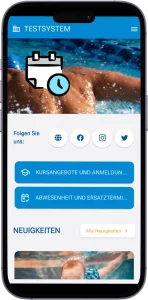
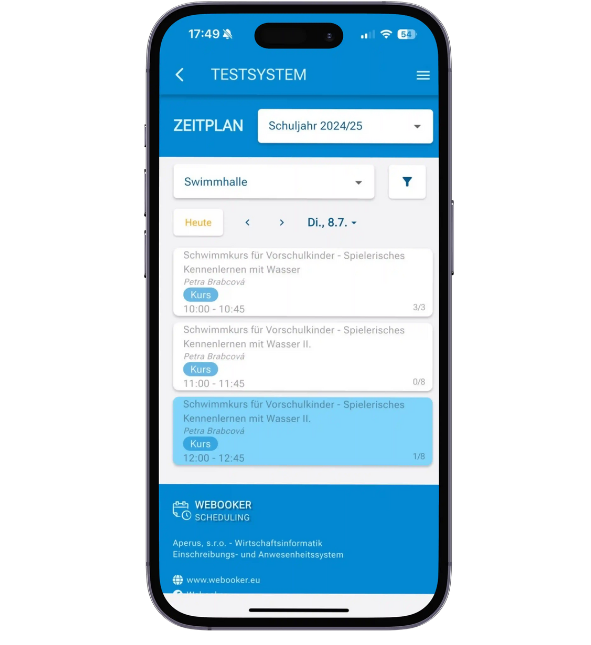
Parents and teachers have a mobile interface.
Parents can excuse a child or choose a compensation lesson in just a few clicks.
Teachers record attendance, notes or work reports directly on their smartphone.
Organizers, however, work with the full system administration – that is available only on a computer.
This keeps everything set up clearly and securely.
Can Webooker be integrated with our website?
Yes, without any problem.
Most often, Webooker is added as a link behind a button – your customers then go directly from your website into the secure system environment, where they can sign up and pay.
If you want to display the course offer directly on your website, it can be integrated from Webooker via API.
However, registration and data entry always take place in Webooker in order to protect sensitive personal data, especially when children are involved.
Alternatively, Webooker can also function as a standalone website without being connected to your existing site.
Can I use Webooker even without technical knowledge?
Yes, absolutely. Webooker is designed so that anyone can use it – even without technical know-how.
The interface is clear and intuitive. Guides and examples walk you through the system step by step.
And if you ever get stuck, you can always contact our email helpdesk.
You are not on your own – we help you get started.
Can the system send emails, newsletters and SMS?
Yes, Webooker has a sophisticated module for mass communication.
You can target specific groups of students – for example by course, group, day of the week or by absence.
When a schedule changes, the system automatically notifies only the affected people – quickly and without errors.
Emails and SMS can be sent directly from the system.
You can also activate the SMS gateway easily whenever you need it.
How does Webooker help my business?
It is for anyone who runs courses, groups, leisure activities or one-off events such as workshops and wants a clear overview of registrations, payments and attendance.
Webooker is suitable for small schools as well as large leisure centers. It supports the operation of swimming schools, language schools, family centers, children and youth clubs, as well as sports clubs.
It handles hundreds of courses, thousands of students and dozens of user accounts without any problem.
Whether you run one afternoon class a week or a full program every day, Webooker helps keep the whole operation under control.
How does Webooker really make my work easier?
Imagine everything just working. Registrations, absence reports, payments and emails – without unnecessary paperwork and manual copying.
Webooker tracks attendance in language courses, automatically issues invoices for dance classes, reminds parents to pay the course fee and matches student payments.
Customers sign up online, teachers know who is coming, and you keep the entire operation in view – including statistics, communication and documents.
You spend less time on administration and more time on what gives your work meaning.
What can I digitize with Webooker?
Your entire course operation – from creating courses, registrations and invoicing to customer communication. But also one-off events, trial lessons, holiday camps, training sessions or workshops.
With Webooker, you create a course offer, accept registrations, send confirmations, issue invoices, set discounts, track payments and monitor attendance and teachers' work reports.
The system manages attendance, absences, compensation lessons, documents, contacts and communication in one place.
In short: what many organizations still handle in Excel, email and paper can all be done digitally in Webooker.
How much time do I save with Webooker?
Hours every week.
With Webooker, you no longer need to copy registrations and course enrollments into spreadsheets, create invoices manually, check incoming payments or search through emails and SMS for excused lessons.
The system records everything for you – registrations, payments, attendance, compensation lessons.
What used to take an entire evening can now be done in a few minutes. And you can invest that time in what moves your business forward.
Is Webooker suitable for seasonal operations?
Yes. Webooker adapts to your operation. Whether you run year-round courses, summer camps or weekend workshops, you can use the system anytime without limitations.
Outside the season, all data remains safely stored, and you always have access to overviews, contacts and payment history.
Thanks to the affordable monthly fee of 30 EUR, the system also pays off if you use it only during part of the year. Webooker is there when you need it – and stays out of the way when you do not.
What if we want to group students by skill level instead of age?
Webooker can handle that too.
The customer first simply expresses interest and states the level – for example beginner or advanced. You can then invite that person to a conversation or a trial lesson, find out what fits and assign the person to the right group.
Invoicing starts only after your confirmation.
This is especially useful for language courses or swimming courses, where age alone is not enough.
How much does the system cost per month?
The monthly flat fee is 30 EUR.
It includes access to all features – with no limit on the number of courses, registrations or users.
Also included in the price are email communication (up to 2000 emails per month), 1 GB of storage, regular backups, data security and all future system updates.
If you want to send more SMS, send more emails or store larger amounts of data, you can add those services according to the current price list.
Do I have to pay additional fees for each payment?
Webooker does not deduct anything from your payments.
The fees depend solely on the price list of your payment provider, for example Stripe.
Our price is final. No hidden costs.
Can I try Webooker first?
Yes.
After registration, you get Webooker free for 7 days.
During that time, you can test the system without obligation.
If you do not cancel the subscription, an invoice is sent automatically and you continue using the service without interruption.
You also receive a reminder so you can decide in time.
Does the price change based on the number of courses or students?
No.
The price depends only on the selected plan: either Business for 30 EUR/month or Business Plus for 69 EUR/month.
In both cases, you can manage as many courses, teachers and registrations as you need.
The system adapts to you – not the other way around.
Business is ideal for smaller teams or solo teachers who want to keep everything under control without complicated administration – suitable for organizations with around 200 active customers per year.
Business Plus is intended for larger operations with more communication, more users and a greater need for automation – for example centers with around 500 or more active customers per year.
Is Webooker GDPR compliant?
Yes – and we place great importance on that.
All Webooker processes and documents were prepared together with a lawyer specializing in data protection.
The system meets European standards for protecting personal data and respects the right to privacy.
Your customers' data is processed securely – and only to the extent necessary for the operation.
You also decide which data you collect and remain fully in control at all times.
Who has access to our students' and staff data?
Only you – and the people you grant access to yourself, for example your teachers or colleagues from course administration, and if needed also your bookkeeper.
As a rule, the Webooker team does not access your data at all. The only exceptions are technical situations where you need help with setup or a bug has to be fixed.
Even then, we act with the greatest care and in line with data protection rules.
Can students pay securely?
All payments through Webooker are protected by verified payment services.
In Germany, we use Stripe, and in Czechia, Comgate.
Payment details are processed directly by these providers – Webooker does not have access to them, because all communication is encrypted and meets international security standards.
Your customers can therefore pay conveniently and securely, and you can be confident that everything runs correctly.
Where is our data stored?
Your data is stored primarily in Google Cloud infrastructure in Frankfurt am Main within the European Union. For certain technical services, in particular transactional email delivery, carefully selected processors outside the EU may be used. Any such transfers take place only on the basis of appropriate safeguards. For details, see our Privacy Policy.
What is Stripe and why does Webooker use it?
Stripe is a proven payment gateway for online card payments, used by companies across Europe.
It supports common credit and debit cards such as Visa, Mastercard, Maestro and American Express, along with other international cards. It also supports digital wallets such as Apple Pay and Google Pay, so parents can pay for courses and events quickly and conveniently online.
The entire payment process is designed to be as simple and secure as possible.
How do I set up Stripe and what do I need?
Stripe is set up directly on the stripe.com website. You need basic information about your organization or company, along with a bank account where course payments will be transferred.
Stripe offers a test environment (sandbox) where you can try the setup without real payments, as well as a live mode for real incoming payments from parents and customers.
A detailed guide for setting up Stripe and connecting it to Webooker is available in the FAQ and directly in the administration.
Can I test online payments via Stripe first?
Yes. Stripe offers a test mode where you can try the entire payment process without obligation and without any real movement of money.
In WEBOOKER administration, you simply choose which courses or events should have online payments enabled and can test everything at your own pace.
You only switch to live operation when you are sure everything works exactly the way you need it to.
How do online payments work in Webooker?
After a card payment, the registration is automatically marked as paid. The payment is assigned automatically to the relevant student and the relevant course or event, the receivable is closed and you immediately get an overview of order statuses.
WEBOOKER also automatically creates a payment confirmation, for example for insurance purposes, and sends it by email to the student. Stripe then transfers the amount to your bank account according to its own payout schedule.
The result is fewer manual steps, fewer errors and much faster payment processing.
How does getting started with Webooker work?
Simply online and without any complicated setup.
After registration, you answer a few basic questions about your courses, and the system adjusts automatically.
We create your own web address for you, for example yourcompany.webooker.eu, which you open in the browser.
In the administration, you then set everything up yourself – from courses to payments.
No installation is required. Everything runs fully online.
Your customers sign up through the browser, and parents can also use the mobile app in the App Store or Google Play.
Do you offer technical support and help with getting started?
Of course.
You always have access to our email helpdesk whenever you need support.
You also have online guides and an extensive FAQ available.
Can I recommend Webooker and get involved?
Absolutely.
If you have had a good experience with Webooker and would like to recommend it, we would be happy to have you involved.
We are currently preparing a program for ambassadors and partners – especially for teachers, organizers and engaged parents.
Joining is very simple: contact us and we will send you all the information.
How does the referral reward work?
Very simply.
Recommend Webooker to others – for example colleagues, acquaintances or a school that offers courses similar to yours.
If a new customer registers through your referral link and upgrades to a paid version, you receive a reward.
You can choose: one month free or 30 EUR in cash.
Would you like to learn more about the partner program?
You can find all conditions and a guide to getting started on our website.
Download the WEBOOKER app


Pricing
Choose the package that suits your business.
Each includes all key features. The difference is only in size.
Business
Ideal for smaller teams and independent teachers
€30 / month
- ✓ All features included
- •10 SMS included, each additional SMS: €0.12
- •2,000 emails included, each additional 1,000: €1.99
- •2 GB cloud storage included, each additional GB: €0.99
- •1 minute online conference: €0.03
BESTSELLER
Business Plus
For larger centers with teams and busier day-to-day operations
€69 / month
- ✓ All features included
- •100 SMS included, each additional SMS: €0.10
- •10,000 emails included, each additional 1,000: €1.80
- •10 GB cloud storage included, each additional GB: €0.80
- •1 minute online conference: €0.02
What our customers say
WEBOOKER is already used by hundreds of schools and centers across the Czech Republic. Here is what people who work with WEBOOKER every day say: